
The Lead-Gen Stack You Can Consolidate: Form, Qualification, Booking, CRM, and Meta Tracking
The Stack Most Lead-Gen Teams Actually Run
A funnel that books qualified calls usually ends up assembled from five or six separate tools: a form builder, a scheduler, something for qualification, a CRM, an automation layer to connect them, and a tracking platform to report on it.
Each one works. The problem is the seams between them. Every handoff is a place where UTMs get dropped, a lead fails to sync, consent is not recorded, or an event never reaches Meta — and when the numbers disagree, nobody can say which tool was wrong.
SmartForm exists to collapse the middle of that chain into one flow: capture, qualify, route, book, sync, and report. This article shows exactly which parts it absorbs, which parts it does not, and the order to roll it out.
What One Platform Covers
Job in your funnel | Typically | With SmartForm |
|---|---|---|
Multi-step lead form | Form builder | Built in |
Financial qualification | Manual call or nothing | X-Ray Vision soft inquiry |
Deciding what each lead sees | Separate pages per segment | Smart Routing rules |
Booking and availability | Scheduler subscription | Built in, with teams and round robin |
Rep assignment | Manual or round-robin tool | Calendar Teams and round robin |
Partial lead capture | Rarely solved | Smart Capture |
CRM delivery | Automation layer | Native GoHighLevel, HubSpot, Pipedrive, ClickFunnels |
Meta conversion events | Tracking platform or Zapier | Pixel Wiring, server-side CAPI |
UTM and click-ID attribution | Tracking platform | Funnel Tracker |
Lead export and reporting | Spreadsheets | Bookings & Leads, Reports, Developer API |
The consolidation that matters most is not the form — it is that qualification, routing, and booking happen in a single request. That is what removes the screening call from the middle of your funnel.
The Four Capabilities Worth Understanding
Each of these has a full guide. Read them in this order if you are evaluating the platform.
1. The form that changes per lead
One form behaves differently for every person based on their financial capacity. Qualified leads reach the calendar, everyone else gets a fitting offer instead of a dead end.
Read Credit-Based Lead Routing.
2. Meta tracking without middleware
Lead, booking, and CRM-stage events go to Meta's Conversions API server-side, with test mode and delivery logs. For many teams this removes a separate tracking subscription.
Read Do You Still Need Hyros or Cometly?

Pixel Wiring maps a SmartForm or CRM moment to a Meta event, per widget.
3. Attribution from click to booked call
UTMs, click IDs from six ad platforms, and Meta pixel cookies captured as first-party data on your own pages, then matched to leads with a recorded confidence level.
Read Track Every Ad Click to a Booked Call.
4. Keeping the form you already have
You do not need to adopt the widget to use the engine. Your own ClickFunnels, GoHighLevel, Jotform, or custom form can post to SmartForm and act on the routing decision it returns.
Read Keep Your Own Form.
Connect the Tools You Keep
Consolidating the middle does not mean abandoning your CRM or calendar. Account-level integrations connect once and then get assigned per widget.

Connect calendars and CRMs once at the account level, then assign them to individual widgets.
Setup details are in Connect Your CRM. For anything without a native connection, Zapier & Webhooks covers the fallback path.
What You Should Not Drop
Being clear about the limits is more useful than a longer feature list:
- Multi-channel attribution modeling. SmartForm's event delivery targets Meta. If you buy meaningfully on Google, TikTok, and YouTube and need unified modeling across them, keep a dedicated platform.
- Call tracking. Not in scope.
- Lifetime revenue and cohort modeling. Not in scope.
- Agency reporting across many clients. Not in scope.
- Your CRM. SmartForm delivers leads into it; it is not a replacement for pipeline management.
- Your email or SMS platform. Notifications exist for delivery and booking events, not for campaign sending.
If a vendor tells you a single tool replaces all of that, the claim is doing the selling.
A Realistic Rollout Order
Skipping straight to tracking is the most common mistake. Attribution on a funnel that is not yet routing correctly just measures the wrong thing accurately.
- Get one widget live and converting. Follow Getting Started.
- Connect the CRM and calendar and confirm delivery in Bookings & Leads.
- Add Smart Routing with just two paths first: qualified, and a deliberate fallback for no-score leads.
- Install Funnel Tracker on every page in the funnel so attribution exists before you optimize.
- Add the Meta URL parameters to your ads and publish them.
- Build one Pixel Wiring flow for New Lead, test it in Test mode, then go live.
- Only then retire overlapping tools, one at a time, verifying each in Meta Events Manager and your CRM.

Bookings & Leads is where you verify each stage actually worked, including CRM and calendar delivery status.
Before You Migrate Anything
A few things to settle first, because they are cheaper to answer now than mid-rollout:
- Is this the right fit? Run through the Fit Checklist.
- What does it cost to run? Subscription and per-report pricing are explained in Pricing Breakdown and Report Billing.
- What are your obligations? Qualification data carries responsibilities. Read FCRA Compliance and Data Security.
- Do the terms mean what you think? The Glossary defines X-Ray, Smart Routing, Smart Capture, and the rest.
See the Stack Live
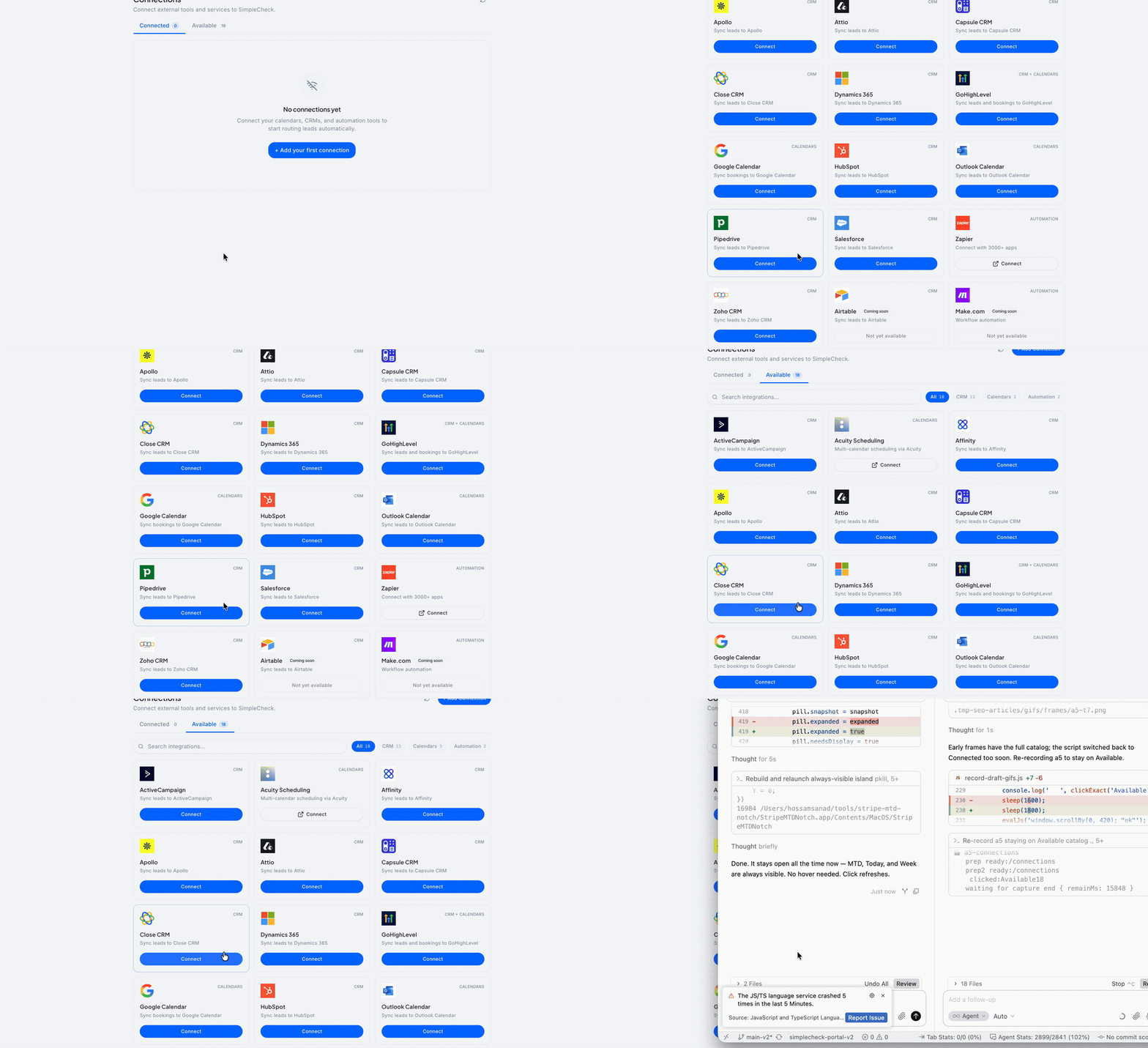
One Connections catalog covers the CRMs, calendars, and automation tools most lead-gen stacks keep after consolidating the middle of the funnel.
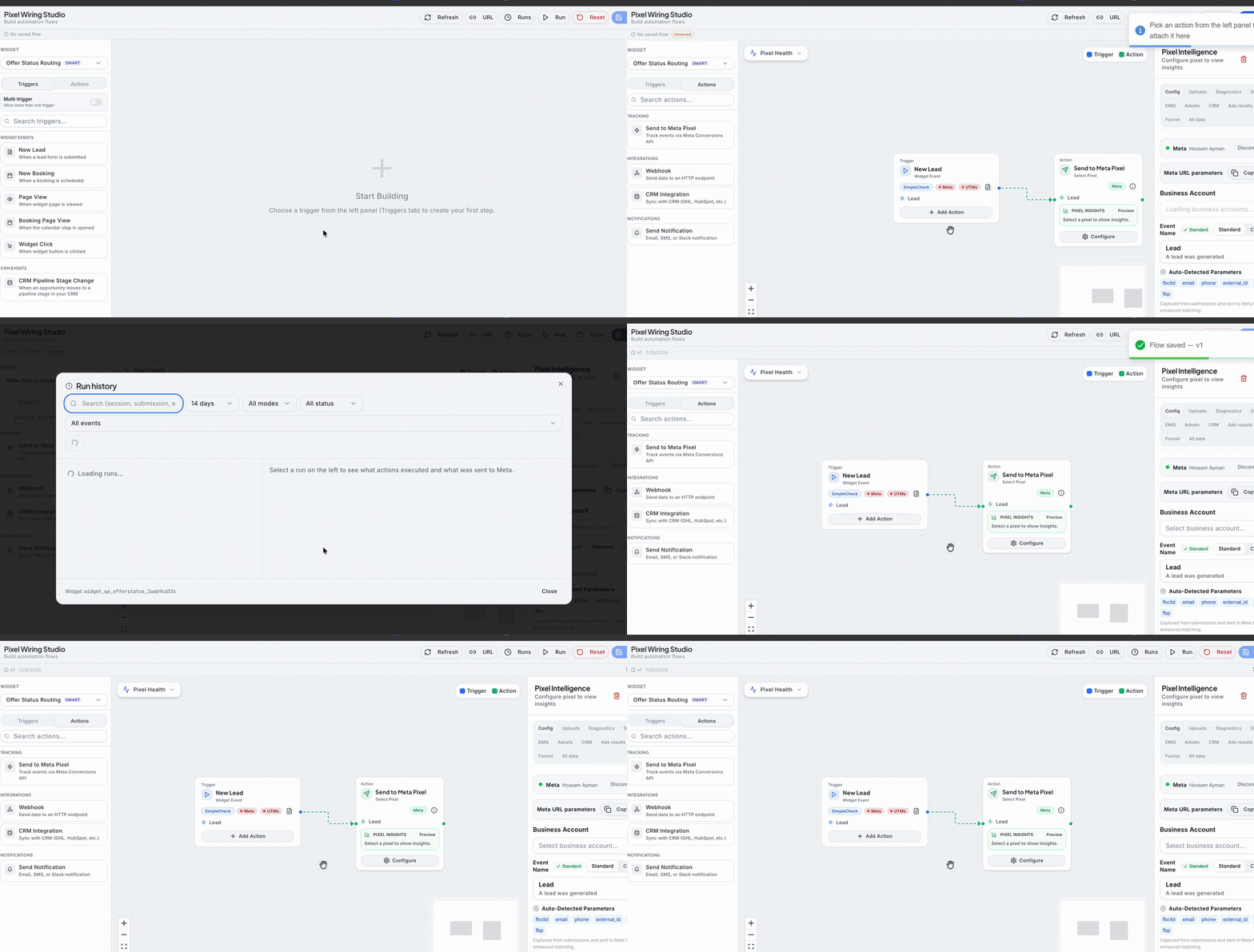
Pixel Wiring maps a SmartForm moment to Meta's Conversions API — add the trigger, attach Send to Meta Pixel, and configure matching parameters without a separate tracking subscription.
Where to Start
If you are still evaluating, read Credit-Based Lead Routing — it is the capability the rest of the platform is built around.
If you already have a widget live, the highest-value next step is usually attribution: install Funnel Tracker, add the Meta URL parameters to your ads, and build one Pixel Wiring flow so Meta starts learning from your qualified leads rather than every raw form fill.
Questions the articles do not answer are worth sending to support through the portal — include the widget name and what you are trying to accomplish, and you will get a specific answer rather than a link.
Updated on: 26/07/2026
Thank you!