
Do You Still Need Hyros or Cometly? Built-In Meta CAPI Tracking for Lead Funnels
The Short Answer
If you pay for Hyros or Cometly mainly to get SmartForm lead, booking, and CRM-stage events back into Meta, SmartForm already does that job natively through Pixel Wiring Studio — server-side, per widget, with test mode and delivery logs.
If you rely on those platforms for multi-channel attribution across Google, TikTok, YouTube, and email, for call tracking, for lifetime-revenue modeling, or for client-facing agency reporting, keep them. SmartForm does not replace that scope today.
This article draws the line precisely, so you can cut a subscription you no longer need without losing reporting you actually use.
Quick path: Pixel Wiring → select widget → add trigger → + Add Action → Send to Meta Pixel → connect Meta → Save
What the Middleware Was Actually Doing
For most lead-gen funnels, an attribution platform sits in the middle of a chain like this:
Form submits → webhook or Zapier → tracking platform → Meta Conversions API
That middle layer exists to solve three real problems:
- The browser pixel misses conversions. Ad blockers, iOS restrictions, and cross-domain redirects mean a browser-only pixel undercounts leads.
- Meta needs identity to match. A server event without email, phone, or click identifiers is hard for Meta to attribute to the person who clicked.
- Nobody can see what was sent. When events go missing, you need a log of the exact payload.
Those are the three jobs SmartForm now handles inside the product.
What SmartForm Sends Natively
Pixel Wiring maps a SmartForm or CRM moment to a Meta event and delivers it server-side via the Conversions API.
Available triggers:
- New Lead — a lead form is submitted
- New Booking — a booking is scheduled
- Page View — the widget page is viewed
- Booking Page View — the calendar step opens
- Widget Click — the widget button is clicked
- CRM Pipeline Stage Change — an opportunity moves to a configured stage
That last trigger is the one people usually buy middleware for. It means a lead reaching "Appointment Set" or "Closed Won" in your CRM can send a Meta event without any external automation.

Connect Meta with OAuth, pick the Business Account and Pixel, choose a standard or custom event name, and review the matching parameters SmartForm detected.
Matching parameters included automatically
Pixel Wiring uses the identifiers already captured with the submission when they are available:
- fbclid
- phone
- external_id
- fbc
- fbp
Better match inputs generally help Meta connect a server event to the right person. The final match quality is always Meta's calculation, not something SmartForm can promise.
Consistent ad URL parameters
The studio generates a Recommended Meta Ads URL parameter template carrying UTMs, campaign/adset/ad names and IDs, placement, and network source. You paste it once into Meta Ads Manager → Ad → Tracking → URL parameters.

Copy the Recommended template into your ad so every click arrives with the identifiers your events need.
Without this step, server events still send, but attribution detail stays thin. This is the single most skipped part of a migration.
Side-by-Side: What Moves In-House
Job | SmartForm handles it | Keep a dedicated platform |
|---|---|---|
SmartForm lead → Meta CAPI | Yes, natively | — |
Booking → Meta CAPI | Yes, natively | — |
CRM stage change → Meta CAPI | Yes, natively | — |
Per-widget event mapping | Yes | — |
Test events before going live | Yes, with Meta's test_event_code | — |
Delivery logs and payload inspection | Yes, in Run History | — |
Pixel and landing-page health checks | Yes | — |
First-party UTM and click-ID capture | Yes, via Funnel Tracker | — |
Google, TikTok, YouTube, email attribution | No | Yes |
Call tracking | No | Yes |
Lifetime revenue and LTV modeling | No | Yes |
Multi-client agency dashboards | No | Yes |
The honest summary: SmartForm covers the Meta lead-funnel loop end to end. It is not a general-purpose, multi-channel attribution suite.
Migrating Without Double-Counting
Duplicate events are the most common migration mistake, and they quietly distort your cost-per-lead.
Do it in this order:
- Build the new flow first. Add your New Lead → Send to Meta Pixel action and save it.
- Test before switching. Use Run → Manual run, set Mode to Test, paste the test_event_code from Meta Events Manager, preview the payload, then run it. Confirm the event appears in Meta's Test Events.
- Install the URL parameters in the ad and publish the ad change.
- Send one real lead through the funnel and confirm it in Runs.
- Only then disable the old path — the Zapier task, the middleware event, or the legacy toggle.
- Verify deduplication in Meta Events Manager for a full day before trusting the numbers.

Run History filters by date, mode, status, and event, so you can confirm what was sent and what Meta returned.
Duplicates usually come from one of four places: the old middleware still firing, a legacy Meta toggle left on, two Pixel Wiring actions sending the same event, or browser and server events using inconsistent event IDs.
What to Expect After the Switch
Be realistic about the outcome:
- You should see server-side events arriving for leads the browser pixel missed, plus a log you can actually audit.
- You may see reported conversion counts change in either direction, because you are now measuring differently than before.
- You will not automatically see better ad performance. Cleaner conversion signal gives Meta better data to optimize against; the offer, creative, and audience still decide the result.
Anyone promising a guaranteed ROAS lift from a tracking change is selling you something. What you can reasonably expect is fewer missing leads and a clear record of what was sent.
See Pixel Wiring Live
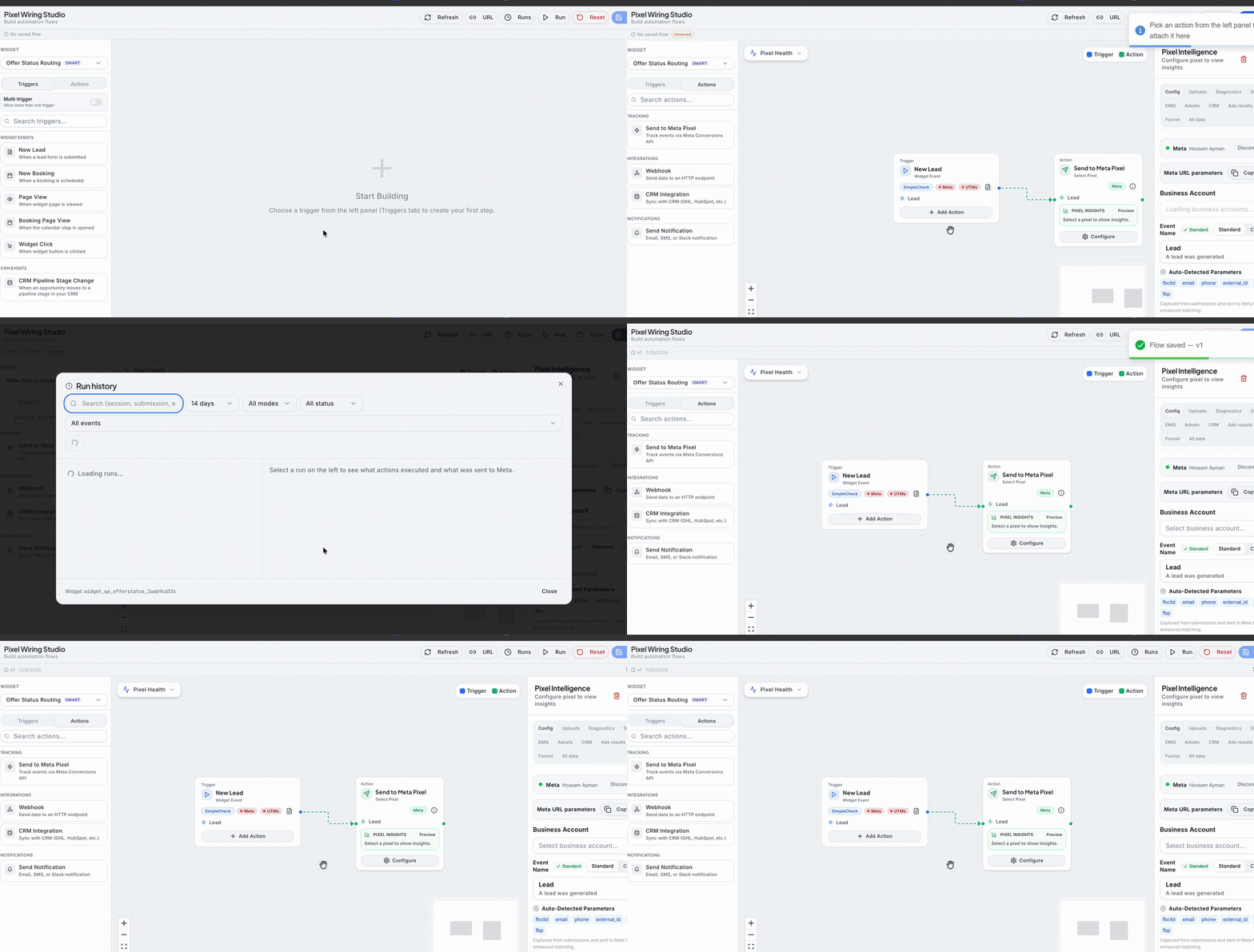
Real setup path: open Pixel Wiring → choose the widget → add a New Lead trigger → + Add Action → Send to Meta Pixel → configure the Business Account, event name, and matching parameters → copy Meta URL parameters → check Runs.
Troubleshooting
Events do not appear in Meta
Open Runs first. If SmartForm recorded no run, the trigger did not fire or the flow was left unsaved. If the run exists but failed, the response detail names the reason.
Meta shows Not connected or Expired
Open the Meta action → Config → Connect or Reconnect. Allow popups for the portal and complete OAuth.
Test events work but live events do not
Confirm the flow is saved and enabled, that real submissions use the same widget and trigger, and that Runs contains Live attempts rather than only Test ones.
UTMs show No data in Trigger Health
The URL parameter template is missing from the ad, or you tested by typing the landing-page URL manually. Test from the real ad or its preview URL.
Events arrive but attribution is empty
Check the URL parameters, then confirm Funnel Tracker is installed on the landing page so click identifiers and cookies are captured before submission.
Next Steps
- Open Pixel Wiring Studio and build one New Lead → Send to Meta Pixel flow.
- Add the Recommended URL parameters to your ad and publish it.
- Run a Test-mode manual run and confirm the event in Meta Events Manager.
- Read the full setup walkthrough in Pixel Wiring Studio.
- Add Funnel Tracker if you also need the journey and UTM detail around each event.
Contact support through the portal with the widget name, trigger, Meta event name, and run time if an event still does not reach Meta. Never send OAuth tokens or access tokens in a support message.
Updated on: 26/07/2026
Thank you!