
Smart Routing on the Form You Already Have: Qualify, Route, and Attribute Without a Rebuild
Your Form Already Converts — That Is Not the Leak
Most lead-gen teams do not have a form problem. They have a who gets the sales call problem, and a which ad paid for that call problem.
The landing page converts. The Jotform / Calendly / GoHighLevel form still works. What breaks next is ordinary: every submit lands on the same calendar, sales burns time on people who cannot afford the offer, and the media buyer still cannot prove which click became the booked appointment.
Smart Routing fixes the first leak without a funnel rebuild. Funnel Tracker fixes the second. Together they sit under the stack you already run — ads, page, form, calendar — and turn every submit into a credit-aware next step that still carries the ad context.
Quick path: contact SimpleCheck with your landing page URL, form/calendar tool, and desired outcomes (who books vs who redirects). Ask to enable Smart Routing + Funnel Tracker on the same page.
What Smart Routing Is
Smart Routing is the landing-page path of SimpleCheck qualification — separate from embedding a SmartForm widget in the portal.
- We configure your routing rules on our side (score thresholds, offer status, redirects, calendar unlocks, messaging).
- You get a tag / script for the landing page.
- The script attaches to the form or calendar you already use.
- On submit or complete, it runs a Soft Pull, evaluates your rules, and executes the action — redirect, unlock calendar, show a message, or send them down a different path.
You keep the page, the brand, the form builder, and the scheduler. SimpleCheck becomes the decision layer underneath.
This is the same decision engine described in Credit-Based Lead Routing — applied to your form instead of a portal SmartForm embed.
The Combo That Matters: Smart Routing + Funnel Tracker
Smart Routing alone answers: should this person see the offer / calendar?
Funnel Tracker alone answers: which ad visit produced this lead?
Together they answer the question media buyers and closers both care about:
Did a qualified lead from this campaign book a call?
Piece | Job on the page |
|---|---|
Smart Routing script | Soft-pull + rules → route the visitor to the right next step |
Funnel Tracker script | Capture UTMs, click IDs, and Meta pixel cookies as first-party data; match the lead to the visit |
Optional Pixel Wiring | Send the qualified / booked events server-side to Meta CAPI when you also use SmartForm events |
That is the full chain without ripping out ClickFunnels, GHL, Jotform, or Calendly:
Ad click → landing page → their form → Soft Pull + route → booked call (or divert) → attribution still intact
Read the attribution deep-dive in First-Party UTM Attribution. For the broader stack story, see The Lead-Gen Stack You Can Consolidate.
How a Visit Flows
- A visitor arrives from Meta / Google / etc. Funnel Tracker stores UTMs, fbclid / gclid, and _fbp / _fbc on your domain.
- They use your form — Jotform, GHL, Calendly, ClickFunnels, Typeform, or custom HTML.
- On submit / complete, the Smart Routing script runs the Soft Pull and evaluates your rules.
- The script acts: send qualified traffic to the offer or calendar path; send everyone else to an unqualified / nurture URL or message.
- The lead is still matched to the visit, so reporting can separate “form filled” from “qualified and booked.”
A typical rule shape looks like: Offer Score above a threshold → qualified path; at or below that threshold → unqualified path. Rules can also key off credit score, offer status, freezes, and other Soft Pull fields — same field set as portal Smart Routing.
Who This Is For
- Teams whose current form already converts and who refuse a rebuild
- Media buyers tired of optimizing for “form submit” when sales only wants people who can afford the offer
- Ops that want the calendar reserved for qualified traffic without swapping Calendly or GHL booking
- Funnel owners who want first-party attribution on the same page that routes
If you are happy to swap the form for a SmartForm embed, that is often faster — start with the embed guides instead. Smart Routing is for the case where the form stays.
What You Keep vs What You Gain
Keep: landing page, form builder, scheduler, brand, ad accounts, CRM.
Gain: credit-aware routing on every submit, Soft Pull without a portal widget rebuild, first-party ad attribution when Funnel Tracker is on the same page, cleaner signal into sales and (optionally) Meta.
Do not need: rewrite the form in SmartForm, rebuild the funnel in a new page builder, or hand-roll Zapier “if submit then book” glue for qualification.
What This Does Not Replace
- Your form builder or Calendly / GHL brand experience
- Full multi-channel attribution suites when you need agency-wide revenue modeling across every channel (see the Hyros / Cometly comparison in Built-In Meta CAPI Tracking for the scoped Meta job)
- A self-serve “paste any CDN URL and invent rules in the portal” install for every third-party form — Smart Routing for external forms is configured with SimpleCheck
Setup (Honest)
This path is managed, not a DIY portal widget rebuild.
- Share your landing page URL, the form/calendar tool, and the outcomes you want (who books, who redirects, who sees a message).
- SimpleCheck configures Smart Routing rules for your account.
- You receive the landing-page script (and the Funnel Tracker snippet if you want attribution on the same page).
- Paste both on the live page (or install via your tag manager).
- We QA a qualified and an unqualified submit before you scale spend.
Most installs take a short onboarding pass, not a development project — especially when the form is a known source (Jotform, Calendly, GHL, and similar).
See Smart Routing Live
Qualified path — Soft Pull passes the rule, visitor stays on / is sent to the offer or booking path:
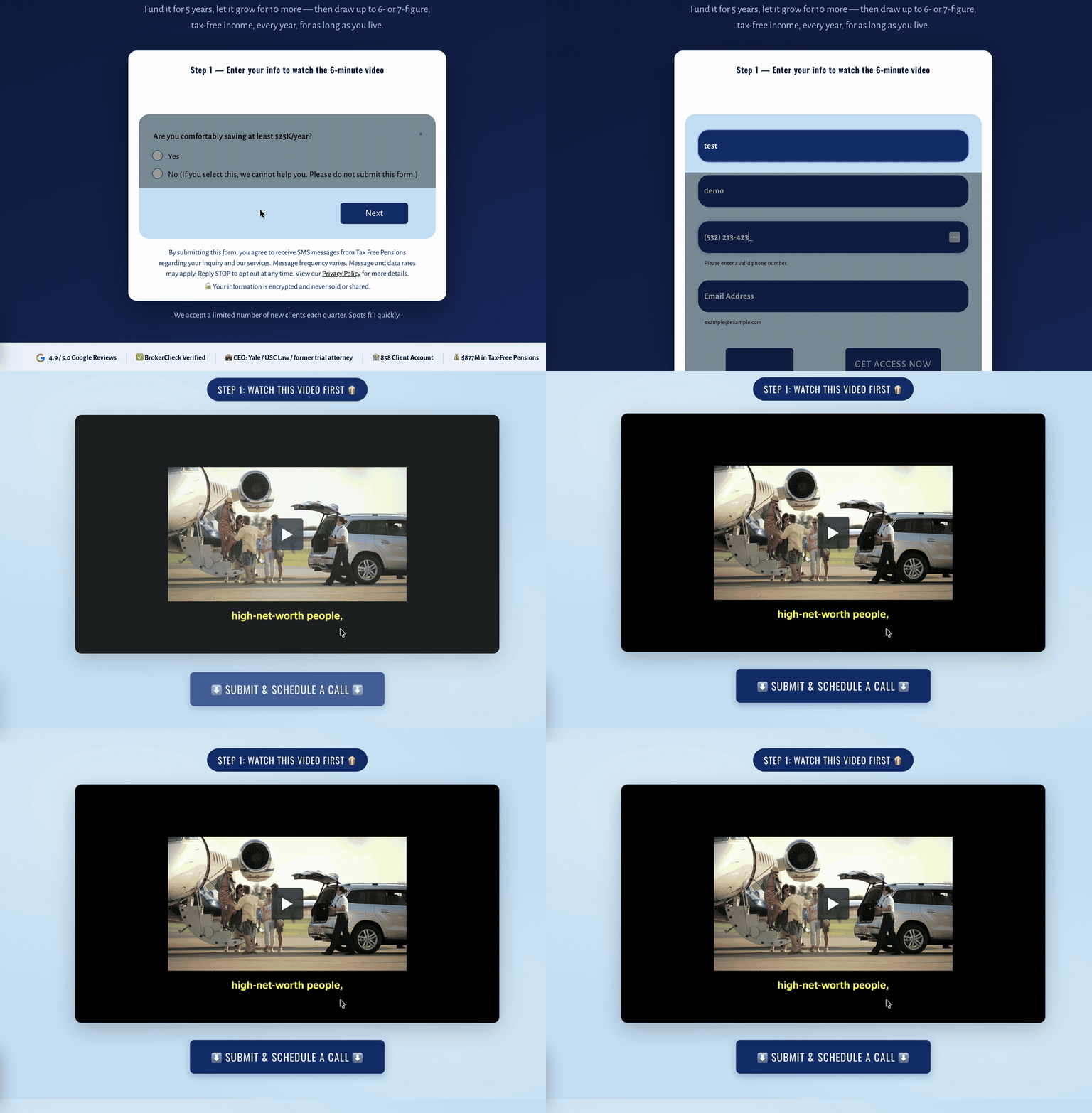
A qualifying Soft Pull result keeps the visitor on the intended offer / booking path.
Unqualified path — Soft Pull misses the threshold, visitor is redirected to the nurture / alternate URL:
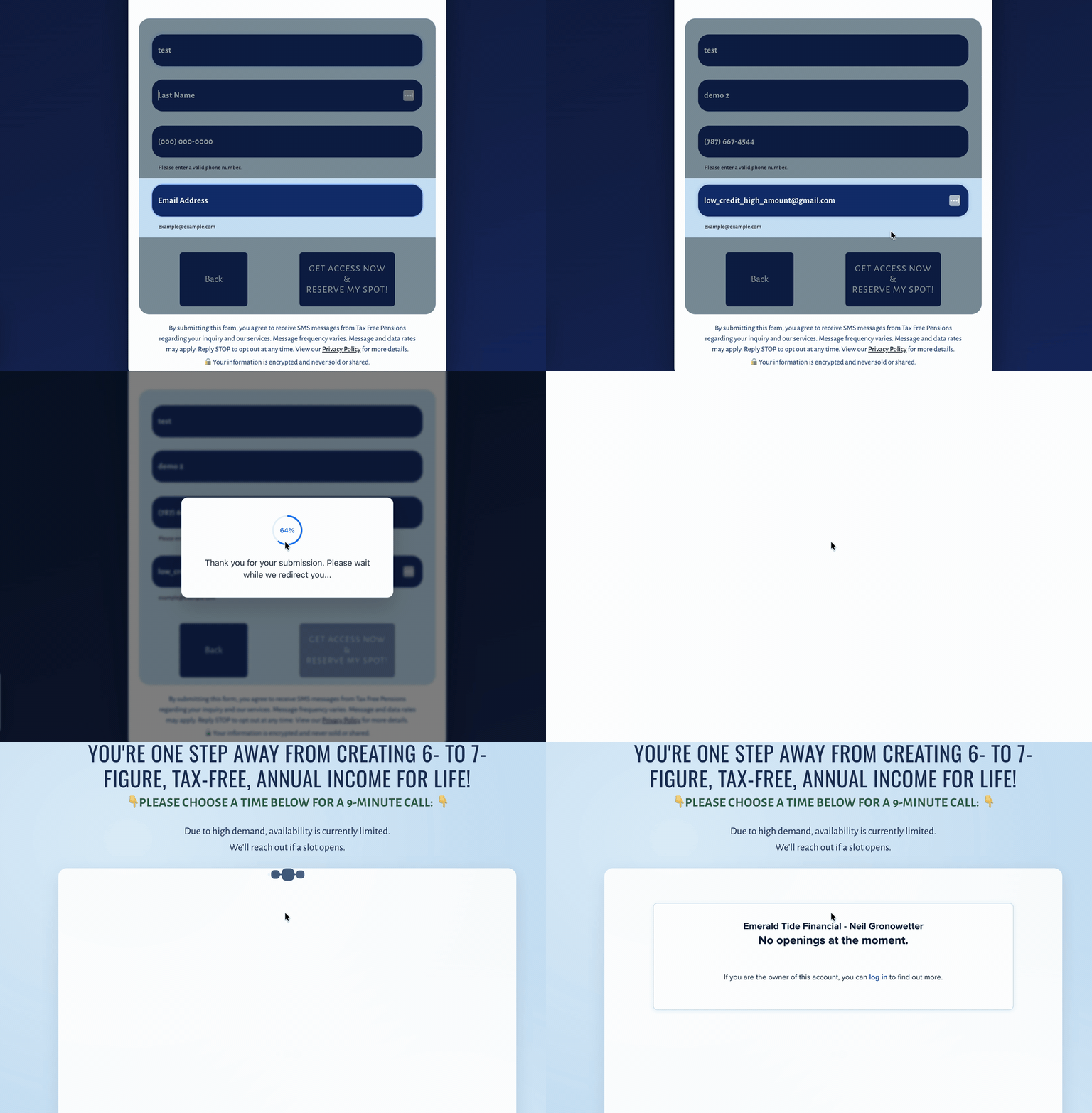
Below the threshold, Smart Routing sends them to the unqualified path instead of burning a sales slot.
Attribution stays attached when Funnel Tracker is on the page:
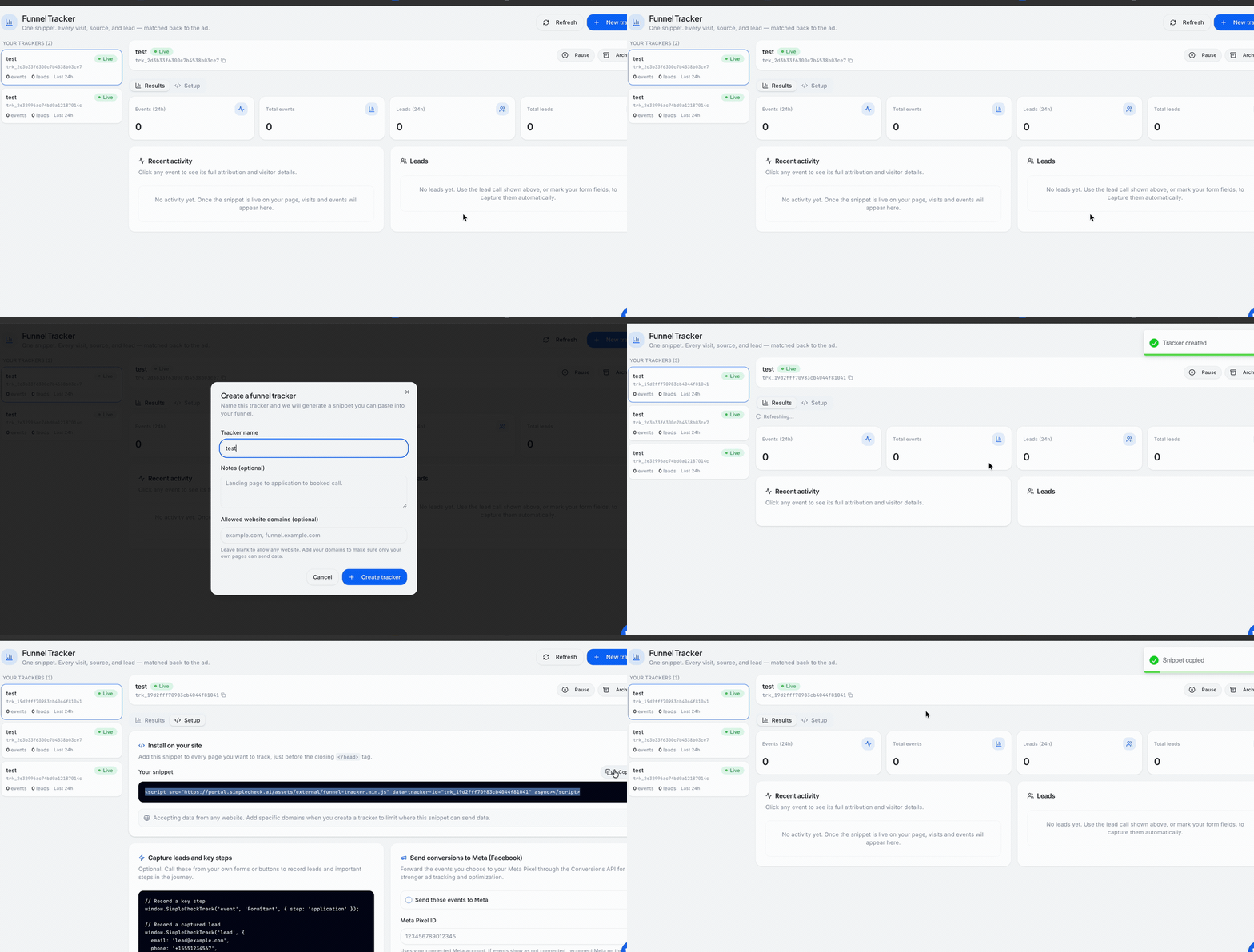
Funnel Tracker holds the ad context against the visit so a routed lead still ties back to the campaign.
Troubleshooting Terms People Search
Symptom | Usually means |
|---|---|
Form submits but nobody routes | Script not on the page, or rules not live for that client — confirm with support |
Everyone hits the same calendar | Rules missing, threshold wrong, or Soft Pull not returning the field you route on |
Redirect works, attribution empty | Smart Routing is live; Funnel Tracker snippet / domain allowlist is missing |
“Missing UTM” on booked calls | Tracker not on the landing URL the ads hit, or lead arrived without session/visitor match |
CRM has the lead, Meta looks blind | Routing saved the contact; Pixel Wiring / CAPI not wired for the conversion events you care about |
Next Step
Contact SimpleCheck support (or your onboarding rep) with:
- Landing page URL(s)
- Form / calendar tool (Jotform, Calendly, GHL, ClickFunnels, custom, …)
- Desired outcomes — who gets the calendar, who redirects, any messaging
- Whether you want Funnel Tracker installed on the same pages in the same pass
If you would rather replace the form entirely, embed SmartForm instead and use portal Smart Routing from Widgets → widget → Widget Setup → Go to Smart Routing. For everyone else: keep the funnel that converts, put Smart Routing underneath it, and let Funnel Tracker prove which ad paid for the booked call.
Updated on: 27/07/2026
Thank you!